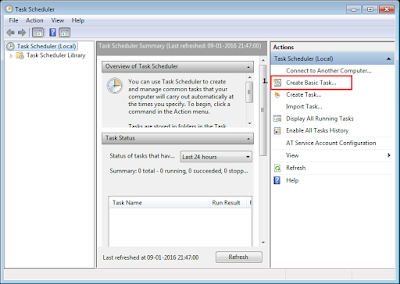
From RPA standpoint it is required from an automation to start on its own depending on the date,time and frequency. OpenSpan runtime can be scheduled to start on its if we can make use of Task Scheduler. Let us assume that the Automation should run every week on Wednesday at 7:00 PM. Below steps will explain further :- 1. Open Task Scheduler Start --> All Programs --> Accessories --> System Tools --> Task Scheduler. 2. Click on "Create Basic Task". 2. Give this Task a name and description. 3. Select a Trigger. 4. Suppose we have selected Weekly trigger in step 3. We will now select Start Time, Recurrence and day of the week. 5. Select Action, here we will select 'Start a Program' as we have to start OpenSpan.Runtime.exe. 6. Now set executable path of OpenSpan.Runtime.exe to Program/Script and set Add argument as "Project = Deployment file path (.OpenSpan file)" 7. Once finished with step 6, now comes the ...



Hi Aditya, Went through your post on mix Model for citrix. what is the procedure for automating the application which is inside the citrix server. no application to automate in client level. in this case is it enough to install studio and runtime in citrix serer to interrogate and deploy? it would be helpful if you share your input
ReplyDelete